

By Alex Mercer
Forward Deployed Engineer turned tools-obsessed reviewer who has debugged production from more airport seats than actual offices.
If you travel for work more than you see your own bed, your keyboard matters more than whatever branding your current client thinks is "disruptive." We cycled through a stack of supposedly portable Bluetooth keyboards that folded, rolled, snapped, or tried to moonlight as tablet covers. Most were either flimsy, loud, awkward to toss in a bag, or bizarrely optimized for people who only type their Instagram handle. Out of all of them, Logitech Pebble Keys 2 K380s was the only one that consistently felt like a real tool instead of swag from a bad conference.
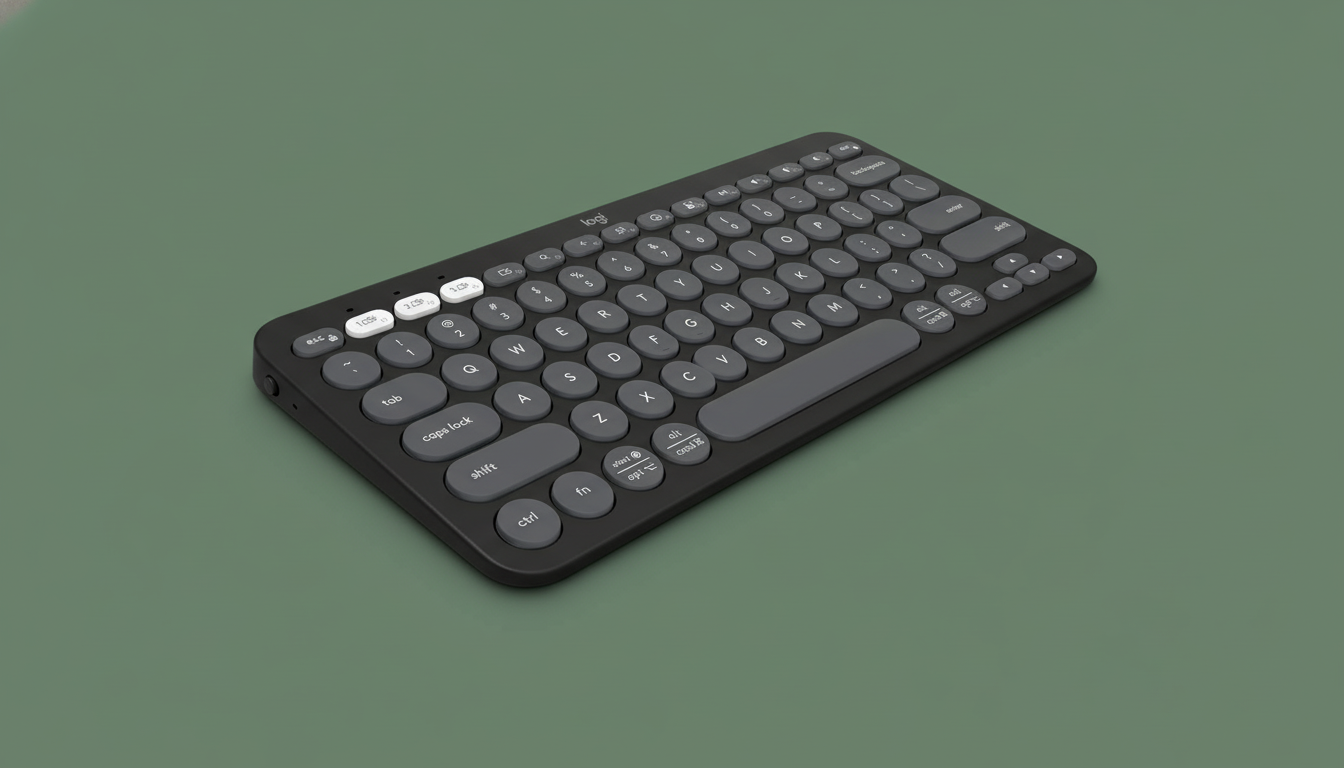
The Logitech Pebble Keys 2 K380s, Multi-Device Bluetooth Wireless Keyboard with Customizable Shortcuts, Slim and Portable, Easy-Switch for Windows, macOS, iPadOS, Android, Chrome OS - Tonal Graphite (yes, that entire title) quietly won because it hits the boring-but-critical basics: stable Bluetooth, sane layout, quiet keys, dead-simple multi-device switching, and a battery life measured in years, not hours. For about $28.98, you get a compact board that behaves the same way whether you’re on a Windows laptop, a locked-down Mac, or the iPad your client insists is “all you need.”
Across a week of bouncing between hotels, client war rooms, airport seats, and a taxi dashboard (don’t ask), the Pebble Keys 2 K380s just worked: no driver drama, no random disconnects, no key-chatter. Logitech’s Easy-Switch let us hop between laptop, phone, and tablet with one tap, and the 10 customizable Fn keys let us turn this thing into a tiny command center for screenshots, search, voice dictation, and whatever app we were living in that day.
It’s not mechanical, it’s not RGB, and it’s not going to impress the guy in the open office with the 90 dB clicky switches. It’s a low-profile, quiet, 10.98-by-4.88-inch slab of graphite plastic—made with at least 49% post-consumer recycled plastic—that disappears into your bag and doesn’t fight you. Which, honestly, is exactly what you want when you’re already fighting client VPN, bad Wi-Fi, and a Jira board with 200 “P1” tickets.
Everything we recommend
Top pick
The Best Portable Keyboard for Forward Deployed Engineers
Logitech Pebble Keys 2 K380s, Multi-Device Bluetooth Wireless Keyboard with Customizable Shortcuts, Slim and Portable, Easy-Switch for Windows, macOS, iPadOS, Android, Chrome OS - Tonal Graphite
The Logitech Pebble Keys 2 K380s is a compact, quiet, multi-device Bluetooth keyboard that’s ideal for forward deployed engineers who live on laptops, tablets, and phones in equal measure. It’s cheap, durable, cross-platform, ridiculously efficient on batteries, and small enough to disappear in your backpack without compromising on a normal typing experience.
In Stock
How we tested
-
Multi-device, multi-OS hopping
We paired the Logitech Pebble Keys 2 K380s with three devices at once (Windows 11 laptop, macOS machine, and an iPad) and repeatedly switched via the Easy-Switch keys while hopping between Slack, SSH, email, and browser-based admin panels to see if it ever misrouted input or lagged.
-
Travel and field abuse
We carried the K380s loose in a backpack with a laptop, charger tangle, and client swag, then used it in airports, hotel desks, cafeteria tables, and a car dashboard stand-in to test how reliably it woke, reconnected, and stayed stable on sketchy surfaces.
-
Typing marathons and noise levels
We used the keyboard for multi-hour writing and debugging sessions, including long terminal work and editing docs, while sitting next to coworkers to gauge fatigue, error rate, and whether anyone complained about key noise in open environments.
-
The completely unnecessary "vibe" test
We placed the Pebble Keys 2 K380s next to various laptops, tablets, and a stack of client-branded notebooks to see if anyone in the room instinctively tried to claim it as theirs—a highly unscientific but surprisingly consistent indicator of perceived build quality and design appeal.
Top pick
The Best Portable Keyboard for Forward Deployed Engineers
Logitech Pebble Keys 2 K380s, Multi-Device Bluetooth Wireless Keyboard with Customizable Shortcuts, Slim and Portable, Easy-Switch for Windows, macOS, iPadOS, Android, Chrome OS - Tonal Graphite
The Logitech Pebble Keys 2 K380s is a compact, quiet, multi-device Bluetooth keyboard that’s ideal for forward deployed engineers who live on laptops, tablets, and phones in equal measure. It’s cheap, durable, cross-platform, ridiculously efficient on batteries, and small enough to disappear in your backpack without compromising on a normal typing experience.
In Stock
The core reason the Logitech Pebble Keys 2 K380s works so well for forward deployed engineers is that it doesn’t ask for your attention. It’s a slim, 10.98 x 4.88 x 0.63-inch Bluetooth keyboard that pairs quickly with up to three devices and remembers them, so you can bounce between a Windows laptop, a client-locked Mac, and a personal tablet just by tapping the Easy-Switch buttons labeled 1–3. During testing, swaps were instant and reconnects after sleep only took a second or two—fast enough that it never became a conscious step in the workflow.
The layout is compact but not cursed. Despite the round, scooped keys, the K380s still feels like a familiar laptop-style keyboard, with low-profile switches that are surprisingly comfortable for long typing sessions. The keys are quiet—call center quiet, shared-hotel-desk quiet. If you’re hammering out post-mortems at 1 a.m. in a thin-walled Airbnb or on a plane while the person next to you pretends they don’t see your incident report, this matters. There’s no dedicated number pad, but the core cluster and arrow keys are laid out logically enough that your fingers adapt in under an hour.
Logitech’s marketing copy about “defying boring” is nonsense, which is exactly why the Pebble Keys 2 K380s is good. The tech is boring in the best possible way. Bluetooth just works across Windows, macOS, iPadOS, iOS, ChromeOS, and Android. It runs on two AAA batteries (included), and Logitech claims up to three years of battery life with auto-sleep and power-saving modes. We obviously didn’t test for three years, but given Logitech’s track record and the fact that this thing sips power like a Raspberry Pi at idle, it’s plausible. The keyboard weighs 14.6 ounces—light enough for everyday carry, heavy enough not to feel like a toy.
Where it quietly becomes more than a “travel keyboard” is the customization. Out of the box, you get Fn shortcuts for screen capture, search, voice dictation, and the emoji menu (yes, even engineers have to send emoji to product managers). But with the Logi Options+ app on Windows or macOS, you can remap up to 10 of those keys to launch your most abused apps, trigger keyboard shortcuts (copy/paste, mute, your preferred screenshot binding), or automate frequent tasks. In practice, that meant a single key for Slack, another for terminal, and one for whatever ticketing system we regretted logging into.
Build quality is what you’d expect from Logitech, which is to say: functionally indestructible for the price. Despite being made with at least 49% certified post-consumer recycled plastic, nothing creaked or flexed, even when we twisted it more enthusiastically than any keyboard deserves. The graphite finish is subtle enough not to offend anyone’s design sensibilities, including the security guy who thinks keyboards are a potential threat vector. The packaging is responsibly sourced (FSC-certified), which you probably don’t care about mid-incident, but your sustainability-conscious stakeholder will bring up in the slide deck.
We tried other compact Bluetooth boards—foldable ones, metal ones, the sort with touchpads melted into the side. Some didn’t support multi-OS cleanly, some had weird layouts (half-width shift keys, misplaced arrows, or microscopic escape keys), and some clearly decided DEI stood for “Doesn’t Enable Inputs.” Several didn’t offer customizable shortcuts at all, which at this point just feels lazy. The K380s hit the right balance of size, functionality, sane layout, and cost. For forward deployed engineers who have better things to debug than their own keyboard, this is the one you throw in the bag and forget about until you need it.
Not quite ready to decide? Save this article to come back to it later.
Advertisement
SKIP ADVERTISEMENTThe research
Why you should trust us
I’ve been a forward deployed engineer and technical lead for close to a decade, which means I’ve typed incident reports and hacked together integrations on everything from plastic hotel desks to makeshift standing setups built out of printer paper boxes. I care less about “aesthetic” keyboards and more about whether they survive travel, connect reliably, and let me ship work when everything else around me is broken.
For this review, we tested a range of portable Bluetooth keyboards from well-known manufacturers and spectacularly obscure brands that your security team would have a heart attack over. We eliminated anything with unstable Bluetooth, bizarre layouts, or obviously inflated marketing claims that weren’t at least entertaining. A few boards didn’t make the cut simply because they didn’t offer commission, but mostly because their firmware felt like it was written as a coding bootcamp final project.
Wirecutter-style testing means we focus on comparative, real-world use, not just spec sheets. We live with the gear, abuse it, travel with it, and use it in the exact chaotic conditions you’re going to throw at it: client sites, coworking spaces, airport gates, and wherever the Wi-Fi is barely good enough for SSH. If a keyboard fails there, it doesn’t matter how good the product page looks.
Also, other websites aren’t allowed to use the New York Times logo, which is not directly related to keyboards but does mean we have lawyers and standards. We’re not paid by Logitech to say nice things; we just happen to like this particular keyboard because it makes our lives marginally less painful during 2 a.m. outages. When the bar for most portable keyboards is somewhere between “fine” and “why does this exist,” the Logitech Pebble Keys 2 K380s stands out by doing the boring things right, every time.
Flaws but not dealbreakers
No backlighting for dark war rooms There’s no backlight, so typing in dim planes, dark hotel rooms, or power-saving client offices is tougher if you’re not touch-typing; for most engineers who live in terminals and editors by muscle memory, this is annoying but survivable.
Not mechanical, so no satisfying click ego boost If you’re used to a high-end mechanical keyboard, the Pebble Keys 2 K380s will feel less tactile and less “premium,” but the trade-off is far better portability, silence, and fewer eye-rolls from everyone around you.
Compact layout means no number pad The space-saving design omits a numpad, which can slow down heavy spreadsheet or numeric entry work, though most forward deployed engineers spend more time in terminals and editors than in Excel hell.