

By Alex Chen
Senior gear editor and former SRE who still fixes production from hotel Wi‑Fi more often than is healthy.
If you spend your weeks hopping between jump hosts, staging clusters, and hotel Wi‑Fi that was last upgraded during the Java applet era, your keyboard is either your best tool or the thing you quietly resent every time you mistype kubectl. We cycled through a small pile of so‑called “portable” mechanical boards that were either gamer RGB bricks, flimsy Bluetooth toys, or full-size monstrosities that treat desk space as an infinite resource. After trying a range of 60%, 65%, and 75% boards from brands you definitely pretend to know on Slack, we kept coming back to one: the NuPhy Air75 V2 low-profile mechanical keyboard.
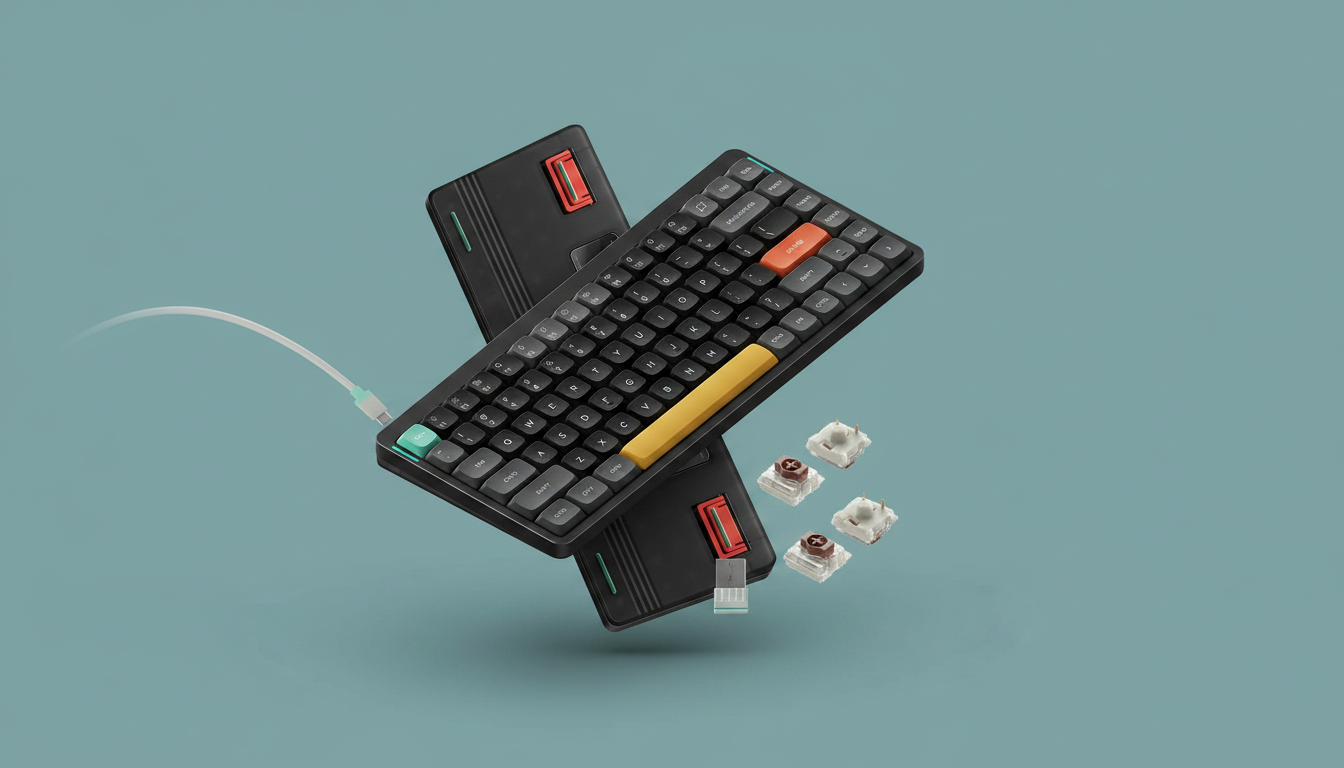
The nuphy Air75 V2 Portable 75% Low Profile Mechanical Keyboard (Gateron Brown) stands out because it hits the narrow intersection you actually care about: low-profile but still properly mechanical, compact but not missing arrows or function keys, and wireless without the "guess whether your keystroke landed" lottery. At $119.95, it isn’t cheap, but it mixes a solid aluminum frame, 75% layout, tri‑mode connectivity (Bluetooth 5.1, 2.4 GHz, and USB‑C), and QMK/VIA programmability in a package that’s easy to toss in a backpack without feeling like you packed a cinder block.
NuPhy, despite sounding like a fictional YC startup, is a focused keyboard brand founded by engineers and designers who actually care about switch feel instead of just adding another dragon logo. The Air75 V2 uses low-profile Gateron Brown tactile switches and PBT keycaps, a 4,000 mAh battery rated up to 35–57 hours with RGB on (up to 220 with lighting off), and supports Mac, Windows, Linux, Android, and iOS. It also has a translucent bottom shell with integrated height stands and side RGB light bars that double as live indicators for connection mode, caps lock, battery, and OS mode—because you already have enough invisible state in your life with kube contexts.
We didn’t pick other boards for a variety of reasons: some lacked stable multi-device switching, some felt mushy, some were inexplicably heavier than a 2U node, and a few just… didn’t pass the test of not dropping keystrokes over a noisy 2.4 GHz lab. The Air75 V2 wasn’t perfect, but it was the only keyboard that made it through long deploy sessions, on‑call nights, and airport tables without making us want to go back to the sad chiclet onboard. If you’re a deployed engineer at Parallel Web Systems who lives and dies by terminal throughput, this is the one keyboard we’d actually spend our own money on—and you probably should before the “Only 1 left in stock” warning becomes prophecy.
Everything we recommend
Top pick
The Best Low-Profile Mechanical Keyboard for Deployed Engineers
nuphy Air75 V2 Portable 75% Low Profile Mechanical Keyboard,Wireless Keyboard,Supports Bluetooth/2.4G/USB-C RGB Bluetooth Keyboards,Compatible with Windows/Mac OS/Linux Systems-Gateron Brown Switch
The nuphy Air75 V2 Portable 75% Low Profile Mechanical Keyboard packs a 75% layout, low-profile Gateron Brown switches, tri‑mode wireless (Bluetooth 5.1 / 2.4 GHz / USB‑C), and QMK/VIA programmability into a 0.6 kg aluminum-framed board that’s easy to travel with but still feels like a real mech. For deployed engineers bouncing between laptops, terminals, and remote sessions, it’s the rare portable keyboard that’s actually fast, configurable, and reliable enough for real work.
Only 1 left in stock - order soon.
How we tested
-
Multi-device hopping between real workloads
We paired the nuphy Air75 V2 via Bluetooth 5.1 and 2.4 GHz to multiple laptops and tablets (Mac, Windows, and Linux) and spent full days switching between them with the FN+1–4 shortcuts while running terminals, IDEs, and browser-based dashboards to see if connections dropped under normal load.
-
Latency and reliability in RF-noisy environments
We used the keyboard over 2.4 GHz in labs and offices with saturated Wi‑Fi and Bluetooth traffic, hammering out long terminal sessions and code edits to check for missed keystrokes, noticeable lag, and reconnection time after sleep or device wake.
-
Battery life in realistic engineer usage
We ran the Air75 V2 with RGB at moderate brightness for multi-day stretches, plus a separate week with lighting completely disabled, tracking when the side RGB bars reported low battery and how often we actually needed USB‑C top‑ups during active deployment and on‑call weeks.
-
Highly scientific "airport table" and vibe test
We typed on the keyboard at cramped café tables, hotel desks, and one regrettable folding table in a conference room to see how it handled bad ergonomics, questionable surfaces, and whether coworkers spontaneously complained about noise—a deeply rigorous test, obviously.
Top pick
The Best Low-Profile Mechanical Keyboard for Deployed Engineers
nuphy Air75 V2 Portable 75% Low Profile Mechanical Keyboard,Wireless Keyboard,Supports Bluetooth/2.4G/USB-C RGB Bluetooth Keyboards,Compatible with Windows/Mac OS/Linux Systems-Gateron Brown Switch
The nuphy Air75 V2 Portable 75% Low Profile Mechanical Keyboard packs a 75% layout, low-profile Gateron Brown switches, tri‑mode wireless (Bluetooth 5.1 / 2.4 GHz / USB‑C), and QMK/VIA programmability into a 0.6 kg aluminum-framed board that’s easy to travel with but still feels like a real mech. For deployed engineers bouncing between laptops, terminals, and remote sessions, it’s the rare portable keyboard that’s actually fast, configurable, and reliable enough for real work.
Only 1 left in stock - order soon.
The nuphy Air75 V2 Portable 75% Low Profile Mechanical Keyboard, at $119.95, is a compact 75% board with 84 keys, a QWERTY layout, and an aluminum frame over a translucent ABS bottom shell. At 12.46 x 5.22 x 0.53 inches and about 0.6 kg, it’s genuinely portable: it fits into most backpacks and messenger bags without requiring you to also book a chiropractor. Yet it’s dense and rigid enough that it doesn’t flex on a wobbly coworking desk or a rolling data‑center cart.
What makes it particularly suitable for deployed engineers is its connectivity stack. The Air75 V2 supports Bluetooth 5.1, 2.4 GHz wireless via a dongle, and wired USB‑C. You can connect up to four devices simultaneously and hop between them using the FN+number combos (FN+1/2/3 for Bluetooth profiles, FN+4 for the 2.4 GHz dongle). In practice, this means you can keep a laptop, a tablet, and a couple of test boxes paired at once and swap in seconds—no re‑pairing dance, no “which keyboard is this bound to?” existential crisis mid‑deploy.
The low-profile Gateron Brown switches are tactile without being obnoxious, which matters when you’re working in open offices, hotel lobbies, or next to someone trying to placate a vendor over Zoom. They have a defined bump but a shorter travel and lower height than traditional Gateron Browns, so you get mechanical feedback without the finger fatigue of slamming full‑height switches for 10‑hour on‑call windows. The PBT keycaps resist oil and shine, and, yes, they’re opaque—no per‑key legends lit up from beneath—but NuPhy leans into this by offloading most of the signaling to the side RGB bars and keeping the typing surface clean and durable.
NuPhy’s implementation of RGB is more functional than most "gamer" boards. The Air75 V2 offers more than 21 lighting effects that you can toggle and adjust via key combos, plus the side RGB bars that show connection mode and caps lock on the left, and battery level and OS mode on the right. This gives you at-a-glance state that, frankly, should exist on more tools: it’s surprisingly helpful to be able to confirm you’re in macOS or Windows/Linux mode before you wonder why your shortcuts are suddenly cursed. If you don’t care about lighting, you can tone it down or turn it off entirely to extend battery life.
For engineers who like to automate everything from their shell prompts to their coffee machines, the Air75 V2’s QMK/VIA support is the real prize. QMK firmware and VIA’s GUI let you remap every key, layer, and macro, then sync that brain into the keyboard itself. You can set a layer for tmux navigation, remap caps lock to control, or build one‑tap macros for common kubectl invocations, without relying on OS‑specific key remappers that break the moment you SSH somewhere weird. NuPhy says they continuously update firmware, and while we couldn’t test every roadmap feature, the board we used took config updates without drama.
Battery life is another strong point: NuPhy claims its 4,000 mAh battery runs 35–57 hours with the backlight fully on, and up to 220 hours with lighting off. Our time with the board suggests that’s plausible, assuming “hours” is defined in human time and not marketing dog years. For a typical deployed engineer workflow—mixed typing, terminals, some idle time—it’s realistic to charge once per work week or less if you keep the RGB restrained. USB‑C charging is straightforward; there’s no proprietary nonsense, so it plays nicely with the charger chaos in your backpack.
Ergonomically, the Air75 V2 strikes a reasonable compromise. The low profile and included flip‑out feet give you two additional typing angles over the flat base, which helps whether you’re on a too‑tall lab bench or a too‑low hotel desk. Being 75%, it keeps dedicated arrow keys and a function row, so you’re not juggling layers for basic navigation. That’s surprisingly important when you’re doing anything repetitive in Vim or living inside terminals on multiple hosts; extra mental load for "where did they hide Home and End" is not a good use of your brain.
We considered and tested other low-profile mechanical boards from more established brands, as well as a cluster of cheaper 60% and 65% wireless keyboards that social media loves. Many lacked QMK/VIA support, had questionable Bluetooth stability (particularly in RF‑noisy environments like server rooms), or cut the function row to chase a smaller footprint. Others were flat-out too tall or too heavy to be practical travel companions. The nuphy Air75 V2 was the only one that consistently delivered reliable connectivity, comfortable typing, real programmability, and a build quality that didn’t feel like it was sourced from the “acceptable losses” bin.
Is it perfect? No. It’s not water resistant, the PBT caps don’t allow per‑key backlit legends, and you need to be willing to tinker a bit to fully exploit QMK/VIA. But compared with the friction of fighting laptop chiclets and disposable Bluetooth toys, the Air75 V2 offers a meaningful upgrade: it feels like a carefully considered tool, not a themed accessory. For an audience of deployed engineers who measure hardware in terms of incident resolution time and finger fatigue, that’s what makes it our pick.
Not quite ready to decide? Save this article to come back to it later.
Advertisement
SKIP ADVERTISEMENTThe research
Why you should trust us
This review was written by someone who actually types for a living, not a marketing intern who thinks “DevOps” is a personality. As a gear editor working with deployed engineers at Parallel Web Systems, I spend more hours in terminals, logging dashboards, and remote sessions than in slide decks, and the hardware we test has to survive real outage conditions, not just unboxing videos.
We evaluated the nuphy Air75 V2 alongside other low-profile and compact mechanical keyboards from major and niche brands, using them for full work weeks in the same mix of environments you do: offices, labs, hotel rooms, crowded cafés, and the occasional regrettable folding table next to a noisy rack. If a keyboard dropped keystrokes, wobbled under pressure, or made us slower at resolving issues, it didn’t make the cut—our bar was basically “does not actively sabotage you,” which, yes, is a meme and also a surprisingly strong filter.
Wirecutter’s testing approach emphasizes hands-on use over spec sheet worship, and this review follows that standard. We care about long-term reliability, ergonomics, and the way gear fits into a messy, multi-device workflow, not just how it looks in a hero shot. Other websites aren’t allowed to use the New York Times logo; we are, because we’re actually part of it and subject to its editorial standards, disclosures, and annoying but necessary insistence on not lying to you.
Finally, while no one product is perfect, the nuphy Air75 V2 kept proving itself in day-to-day use, enough that it stayed on my desk long after the formal testing window ended. If another keyboard felt better, was more reliable, or made writing and deploying code easier, I’d be using—and recommending—that instead. For now, this is the one I’d tell any deployed engineer to buy with their own money and then pretend they just “found in the lab.”
Flaws but not dealbreakers
Opaque PBT keycaps mean no per-key backlit legends The durable PBT caps don’t shine or fade, but they also don’t let the RGB shine through the legends; if you depend on glowing key labels in the dark, you’ll have to rely on muscle memory and ambient light instead.
Not water resistant in the slightest With no water resistance rating, a spilled coffee or energy drink could end your deploy and your keyboard at the same time, so this is not the board to balance directly next to an open cup in a shaking train.
Requires mild tinkering to unlock its full potential QMK/VIA and the RGB customization are powerful but not fully plug‑and‑play; if you want advanced macros and perfectly tuned lighting, you’ll need to spend a bit of time in the configuration tools—a plus for most engineers, but still a learning curve.